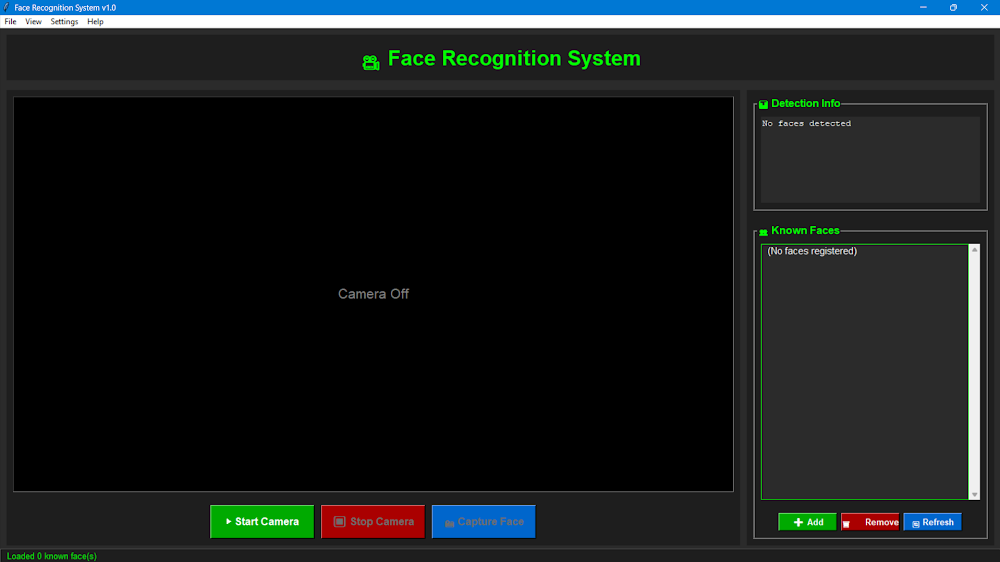
This is a real-time biometric identification desktop app that recognises faces from a live video feed using 128-D face embeddings. I built it for security, attendance tracking and computer vision exploration.
Overview
It's a modular, optimised Python application that uses deep learning to identify faces in real time. A dark-mode GUI sits on top of a multi-threaded backend engine built to process high-FPS video feeds with low latency.
How it works
- Real-time detection: Histogram of Oriented Gradients (HOG) detection, multi-frame skipping and performance-focused threading keep video processing fast.
- Dynamic confidence logic: a colour-coded overlay (🟢 High, 🟡 Medium, 🔴 Low) shows confidence directly on the live feed.
- Identity management: tools to add or remove known faces via webcam capture or file upload.
- Persistent logging: SQLite keeps a filterable history of every identification event, so you can see exactly who was seen and when.
- Desktop GUI: a responsive dark-mode interface built with Tkinter.
Tech stack
Python 3.10+ OpenCV Dlib / Face_Recognition SQLite3 Tkinter Pandas NumPy
Case Study
Face embedding
128-D
Vector compared to identify each face
Problem
Security, attendance tracking and computer vision exploration all need a way to identify faces from a live video feed quickly and keep a record of who was seen. I wanted a desktop app that does this in real time with an easy-to-use interface.
Approach
- Identified faces using deep learning and 128-D face embeddings (Dlib / Face_Recognition)
- Used HOG detection, multi-frame skipping and multi-threading with OpenCV to keep video processing fast
- Overlaid colour-coded confidence levels (High / Medium / Low) on the live feed
- Added tools to add or remove known faces via webcam capture or file upload
- Logged every identification event to SQLite as a filterable history
- Built a dark-mode desktop GUI with Tkinter